
Freshdesk WhatsApp integration for groups and chats
Raise tickets from WhatsApp chats and groups in Periskope and sync them to Freshdesk. Connect with your Freshdesk domain and API key.
Periskope’s Freshdesk integration syncs tickets you raise on WhatsApp in Periskope to your Freshdesk account. You connect it with your Freshdesk domain and API key, then turn customer messages from 1:1 chats or groups into tickets in Periskope. It works with any WhatsApp number connected to Periskope.
What you can do
Sync tickets to Freshdesk: tickets created in Periskope sync to your connected Freshdesk account.
Turn WhatsApp messages into tickets: convert any message in a chat or group into a Periskope ticket with one click or an emoji.
Automate ticket creation: use Periskope automation rules with the Create Ticket action to raise tickets from incoming messages automatically.
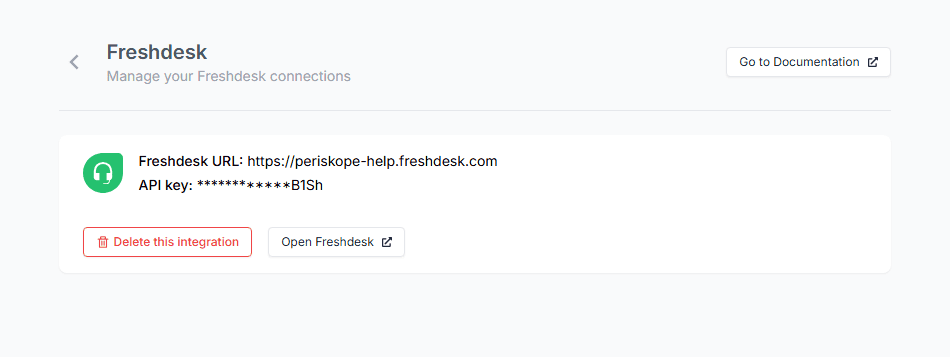
Connect with an API key: link Freshdesk with your Freshdesk domain and API key, then manage or delete the connection from Periskope settings.

How to set it up
Log in to Periskope and open Freshdesk settings at https://console.periskope.app/settings/integrations/freshdesk.
Click Connect.
Enter your Freshdesk domain, for example https://example.freshdesk.com.
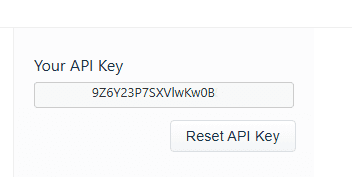
In Freshdesk, go to Profile Settings > Your API Key, copy the key and paste it into Periskope.
Click Connect. Tickets you create in Periskope now sync to Freshdesk.
Use cases
A support team serving clients in WhatsApp groups raises a ticket on any complaint, and it lands in Freshdesk with the rest of their queue.
An automation rule raises a ticket when a message contains keywords such as refund or not working, so it reaches Freshdesk without an agent stepping in.
A team that handles email support in Freshdesk adds WhatsApp as a channel without moving agents to a new helpdesk.
Requirements
A Freshdesk account and its API key
A Periskope account with at least one WhatsApp number connected
Limitations and notes
The integration syncs tickets from Periskope to Freshdesk. Create tickets in Periskope for them to sync.
The connection uses your personal Freshdesk API key, found under Profile Settings > Your API Key.
Frequently asked questions
What do I need to connect Freshdesk?
Your Freshdesk domain, such as https://example.freshdesk.com, and your Freshdesk API key from Profile Settings > Your API Key.
Can I create tickets from WhatsApp group messages?
Yes. Periskope lets you turn any message in a 1:1 chat or group into a ticket, and those tickets sync to Freshdesk.
Can tickets be created automatically?
Yes. Periskope automation rules include a Create Ticket action, so you can raise tickets from incoming messages that match your conditions.
How do I disconnect Freshdesk?
Open Periskope Freshdesk settings and click Delete this integration.
Do I need the WhatsApp Business API?
No. Periskope connects regular WhatsApp and WhatsApp Business App numbers by scanning a QR code, the same way you link WhatsApp Web. There are no template approvals or per-message fees.
Full setup guide: https://docs.periskope.app/integrations/freshdesk
Automate your WhatsApp with Periskope

Features
Integrations


