Features

Integrations

Case Studies

Resources

How to Add an AI Chatbot to WhatsApp Groups (No API Required)

How to Add an AI Chatbot to WhatsApp Groups (No API Required)

How to Add an AI Chatbot to WhatsApp Groups (No API Required)

Anjali Pandey

Feb 6, 2026

If you manage WhatsApp groups for sales, support, or operations, you know the chaos.

The same questions pop up every day. Support tickets pile up. Sales leads wait hours for replies. Your team manually types the same answers over and over.

You've considered hiring more people or switching to an expensive CRM. But there's a simpler fix.

An AI chatbot for WhatsApp groups that handles repetitive tasks for you. 

But here’s the catch: Most WhatsApp AI chatbots require WhatsApp Business API. That means weeks of setup, Meta approval, and technical headaches.

Periskope's AI agent is different. It's an intelligent automation tool for WhatsApp that auto-responds to customer queries, creates support tickets, and syncs with your CRM—all without requiring WhatsApp Business API.

You can set it up in under 5 minutes by scanning a QR code. It works with your regular WhatsApp number, so you can connect it to existing groups where your customers already are. No API required. 

This guide shows you exactly how it works and how to set it up.

If you manage WhatsApp groups for sales, support, or operations, you know the chaos.

The same questions pop up every day. Support tickets pile up. Sales leads wait hours for replies. Your team manually types the same answers over and over.

You've considered hiring more people or switching to an expensive CRM. But there's a simpler fix.

An AI chatbot for WhatsApp groups that handles repetitive tasks for you. 

But here’s the catch: Most WhatsApp AI chatbots require WhatsApp Business API. That means weeks of setup, Meta approval, and technical headaches.

Periskope's AI agent is different. It's an intelligent automation tool for WhatsApp that auto-responds to customer queries, creates support tickets, and syncs with your CRM—all without requiring WhatsApp Business API.

You can set it up in under 5 minutes by scanning a QR code. It works with your regular WhatsApp number, so you can connect it to existing groups where your customers already are. No API required. 

This guide shows you exactly how it works and how to set it up.

TL;DR

  • An AI agent for WhatsApp Business handles customer conversations automatically by searching your knowledge base and responding intelligently

  • Periskope is a WhatsApp AI chatbot that deploys in under 5 minutes without WhatsApp Business API

  • Auto-responds to customer queries by searching your knowledge base (FAQs and documents)

  • Creates support tickets automatically and routes them to the right team members

  • Syncs all conversations, tickets, and notes to HubSpot, Zoho, Google Sheets, or Freshdesk

  • Works with regular WhatsApp numbers—no API application or Meta approval needed

  • Best for businesses managing multiple WhatsApp groups for sales, support, or operations at scale

  • An AI agent for WhatsApp Business handles customer conversations automatically by searching your knowledge base and responding intelligently

  • Periskope is a WhatsApp AI chatbot that deploys in under 5 minutes without WhatsApp Business API

  • Auto-responds to customer queries by searching your knowledge base (FAQs and documents)

  • Creates support tickets automatically and routes them to the right team members

  • Syncs all conversations, tickets, and notes to HubSpot, Zoho, Google Sheets, or Freshdesk

  • Works with regular WhatsApp numbers—no API application or Meta approval needed

  • Best for businesses managing multiple WhatsApp groups for sales, support, or operations at scale

  • An AI agent for WhatsApp Business handles customer conversations automatically by searching your knowledge base and responding intelligently

  • Periskope is a WhatsApp AI chatbot that deploys in under 5 minutes without WhatsApp Business API

  • Auto-responds to customer queries by searching your knowledge base (FAQs and documents)

  • Creates support tickets automatically and routes them to the right team members

  • Syncs all conversations, tickets, and notes to HubSpot, Zoho, Google Sheets, or Freshdesk

  • Works with regular WhatsApp numbers—no API application or Meta approval needed

  • Best for businesses managing multiple WhatsApp groups for sales, support, or operations at scale

What is an AI Agent for WhatsApp Business?

An AI agent for WhatsApp is an automated assistant that handles customer conversations in your WhatsApp groups and chats.

Unlike basic auto-responders that send the same message to everyone, an AI agent actually understands what people are asking. It searches your knowledge base, finds the right answer, and responds naturally.

Here's what makes it different from standard WhatsApp automation:

Basic auto-responders:

AI agents:

Trigger on specific keywords

Understand the intent behind messages

Send pre-written messages

Search FAQs and documents for accurate answers

Can't understand context

Learn from your business information

Work the same for every question

Escalate complex issues to human agents and create support tickets automatically

An AI agent for WhatsApp is an automated assistant that handles customer conversations in your WhatsApp groups and chats.

Unlike basic auto-responders that send the same message to everyone, an AI agent actually understands what people are asking. It searches your knowledge base, finds the right answer, and responds naturally.

Here's what makes it different from standard WhatsApp automation:

Basic auto-responders:

AI agents:

Trigger on specific keywords

Understand the intent behind messages

Send pre-written messages

Search FAQs and documents for accurate answers

Can't understand context

Learn from your business information

Work the same for every question

Escalate complex issues to human agents and create support tickets automatically

Try Periskope

Enable AI Agent on your WhatsApp Groups

Why AI Agents Matter for WhatsApp Groups

Here's why AI agents matter for businesses and the specific problems they solve.

⫸ The group management problem

When you manage support, sales, or operations through WhatsApp groups, three things happen:

1. High-volume, repetitive queries pile up

The same questions appear across multiple groups every day. "What's your pricing?" "How do I reset my password?" "When will my order ship?"

Your team types the same answers 50 times a week. It's exhausting and wastes time.

2. Response times slow down as volume grows

With 10 groups, you can keep up. With 50 groups and hundreds of messages per day, important queries get buried.

Customers wait hours for simple answers. Urgent issues go unnoticed. Your team drowns in notifications.

3. Nothing connects to your CRM or support system

WhatsApp conversations live in isolation. Support tickets don't get created automatically. Customer data doesn't flow to your CRM. Your team manually copies information between systems.

This creates gaps and important context gets lost. 

⫸ How do AI agents solve these problems?

An AI chatbot for WhatsApp groups, like Periskope’s, handles the repetitive work automatically:

✅ Instant responses to common questions - The AI searches your knowledge base and answers immediately. No waiting for a human agent.

✅ Automatic triage and qualification - The AI figures out which messages need urgent attention and which can be handled automatically.

✅ Support ticket creation - When something needs human attention, the AI creates a ticket and assigns it to the right team member.

✅ CRM sync - Conversations, tickets, and customer data flow directly to HubSpot, Zoho, or your support system.

Your team stops doing repetitive work and focuses on complex problems that actually need human judgment.

Here's why AI agents matter for businesses and the specific problems they solve.

⫸ The group management problem

When you manage support, sales, or operations through WhatsApp groups, three things happen:

1. High-volume, repetitive queries pile up

The same questions appear across multiple groups every day. "What's your pricing?" "How do I reset my password?" "When will my order ship?"

Your team types the same answers 50 times a week. It's exhausting and wastes time.

2. Response times slow down as volume grows

With 10 groups, you can keep up. With 50 groups and hundreds of messages per day, important queries get buried.

Customers wait hours for simple answers. Urgent issues go unnoticed. Your team drowns in notifications.

3. Nothing connects to your CRM or support system

WhatsApp conversations live in isolation. Support tickets don't get created automatically. Customer data doesn't flow to your CRM. Your team manually copies information between systems.

This creates gaps and important context gets lost. 

⫸ How do AI agents solve these problems?

An AI chatbot for WhatsApp groups, like Periskope’s, handles the repetitive work automatically:

✅ Instant responses to common questions - The AI searches your knowledge base and answers immediately. No waiting for a human agent.

✅ Automatic triage and qualification - The AI figures out which messages need urgent attention and which can be handled automatically.

✅ Support ticket creation - When something needs human attention, the AI creates a ticket and assigns it to the right team member.

✅ CRM sync - Conversations, tickets, and customer data flow directly to HubSpot, Zoho, or your support system.

Your team stops doing repetitive work and focuses on complex problems that actually need human judgment.

How to Set Up Periskope's WhatsApp AI Agent in 3 Simple Steps
Most WhatsApp AI chatbots take weeks to deploy. You need Business API approval from Meta. Then there’s a technical setup, integration work, etc. Periskope's AI agent works differently. You can have it running in under 5 minutes.

Step 1: Connect Your WhatsApp to Periskope

  1. Open Periskope and click "Connect WhatsApp"

  2. Scan the QR code with your phone

  3. Your WhatsApp connects immediately

That's it. The entire connection takes 30 seconds.

What you can connect:

✅ Regular WhatsApp numbers

✅ WhatsApp Business app numbers

✅ Multiple numbers (if you manage different teams or regions)

Unlike WhatsApp Business API tools, you don't need to switch numbers or migrate existing groups. The AI agent works with the WhatsApp you already use.

Step 2: Enable the AI Agent

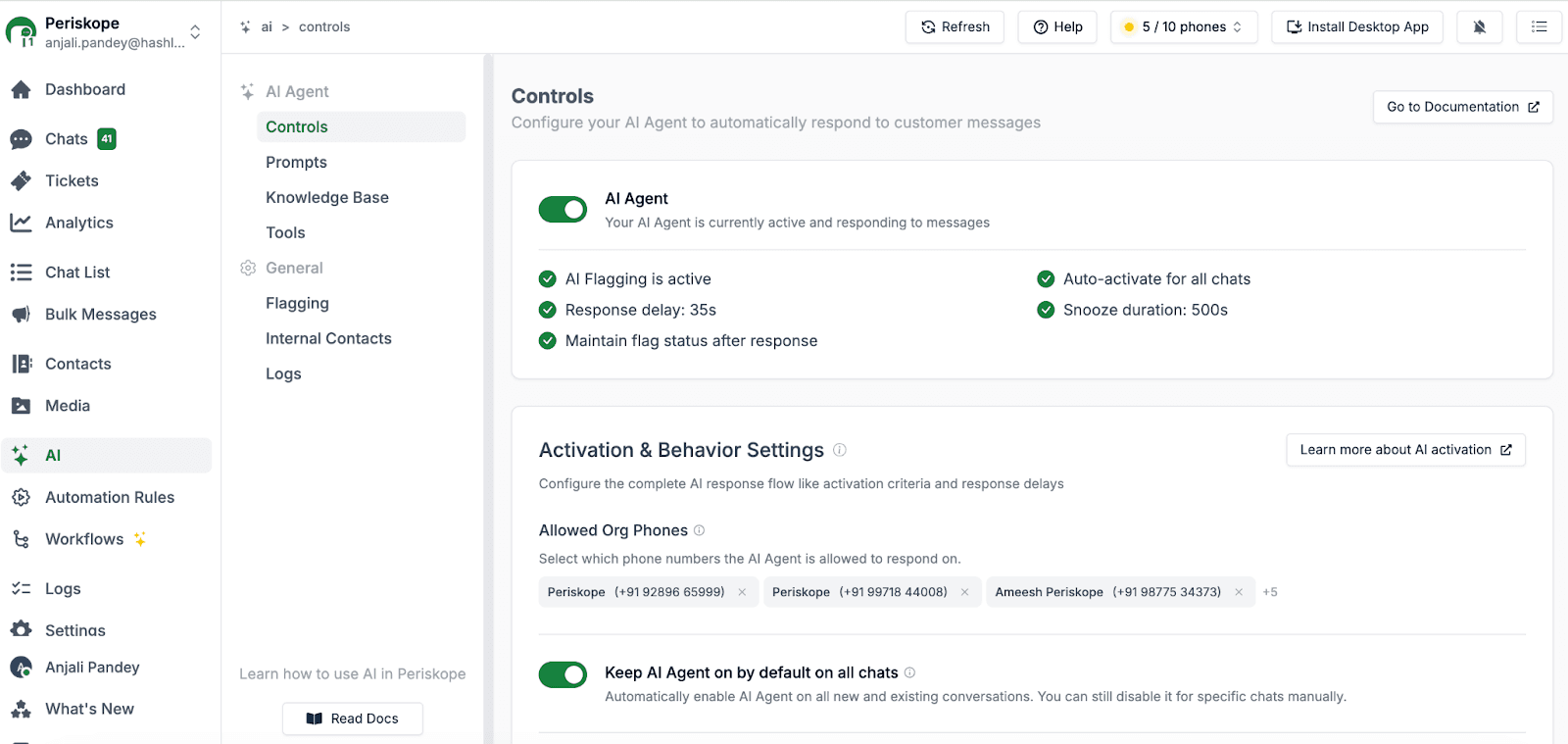
Once your WhatsApp is connected, turn on the AI agent. Go to AI > Controls and toggle the AI agent status to active.

Activate your Whatsapp AI agent

Two quick settings to configure:

→ Auto-activate for all chats

  • Turn this on if you want the AI active on all existing and new conversations

  • Turn it off if you want to manually enable it for specific groups

→ Response delay

  • Set how long the AI waits before responding (by default, it’s 3 seconds)

  • This gives human agents a chance to reply first

That's the basic setup. The AI is now monitoring your conversations.

Step 3: Train Your AI Chatbot

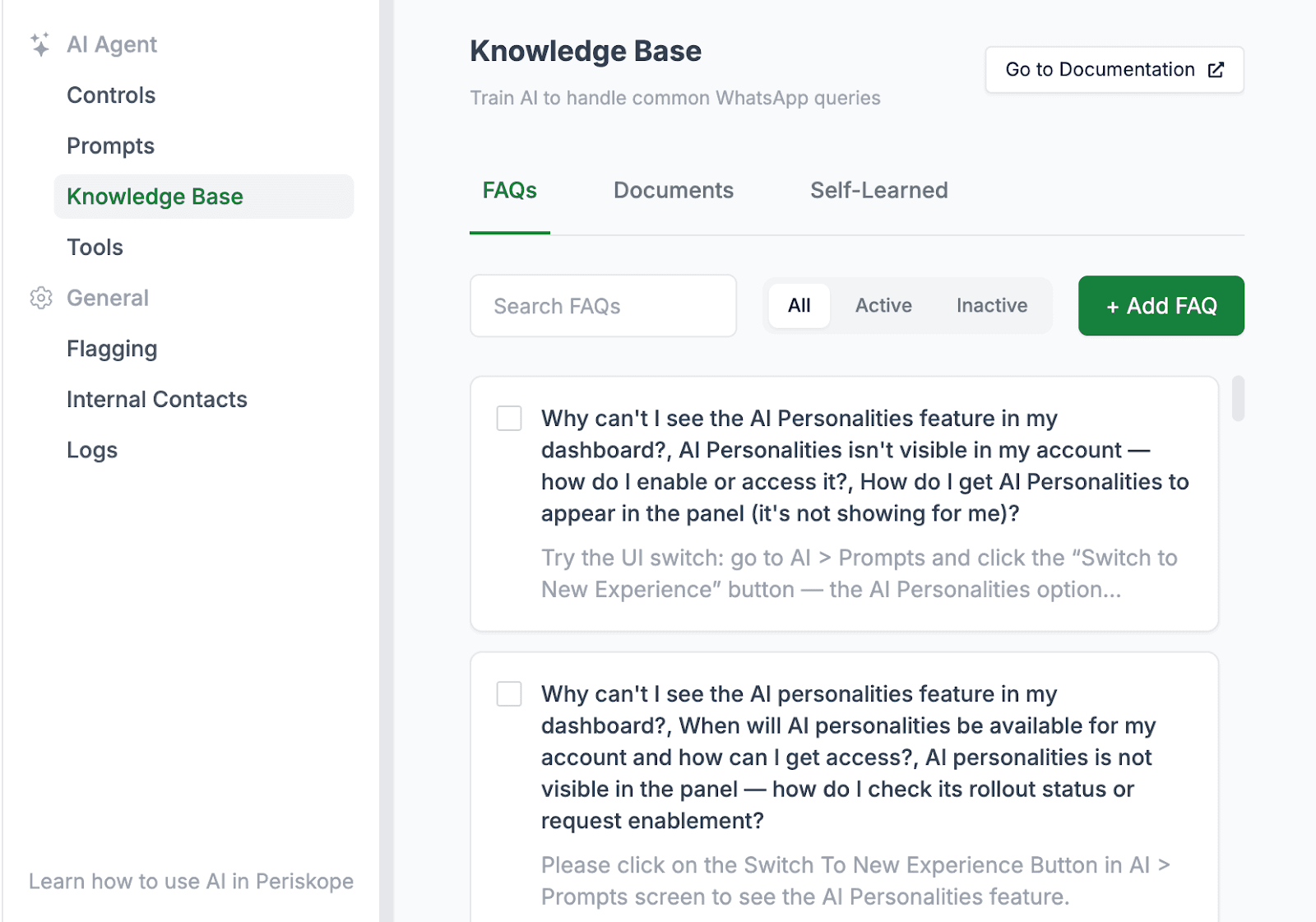
The AI agent needs to know about your business before it can answer questions. Go to AI > Knowledge Base and add information in two ways:

Train your AI chatbot using knowledge base

Option 1: Upload FAQs

Create question-and-answer pairs for common queries:

  • What are your business hours? → We're open Monday-Friday, 9 AM to 6 PM EST.

  • How do I reset my password? → Click 'Forgot Password' on the login page...

The AI uses these to answer customer questions directly.

Option 2: Upload documents

Add PDFs, text files, or paste your help documentation. The AI reads these documents and pulls relevant information when needed. Examples:

  • Product documentation

  • Service guides

  • Company policies

  • Troubleshooting steps

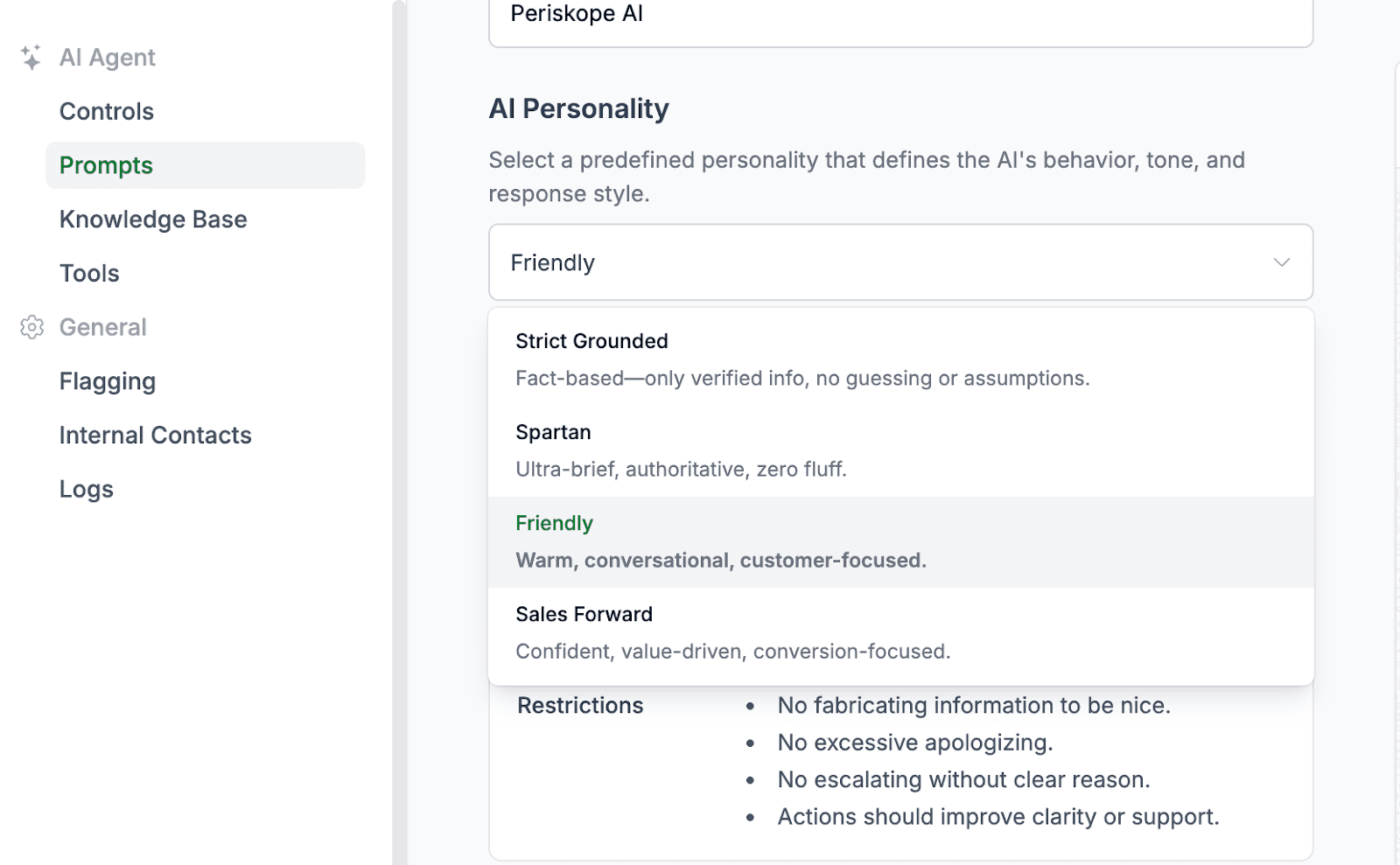
Choose an AI personality

Choose Periskope AI agent personality

Pick how the AI communicates:

  • Friendly - Warm, conversational tone

  • Strict Grounded - Only verified info, no guessing or assumptions

  • Spartan - Short, direct answers

  • Sales Forward - Confident, value-driven, conversion-focused

Your AI agent is now trained and ready to respond.

Most WhatsApp AI chatbots take weeks to deploy. You need Business API approval from Meta. Then there’s a technical setup, integration work, etc. Periskope's AI agent works differently. You can have it running in under 5 minutes.

Step 1: Connect Your WhatsApp to Periskope

  1. Open Periskope and click "Connect WhatsApp"

  2. Scan the QR code with your phone

  3. Your WhatsApp connects immediately

That's it. The entire connection takes 30 seconds.

What you can connect:

✅ Regular WhatsApp numbers

✅ WhatsApp Business app numbers

✅ Multiple numbers (if you manage different teams or regions)

Unlike WhatsApp Business API tools, you don't need to switch numbers or migrate existing groups. The AI agent works with the WhatsApp you already use.

Step 2: Enable the AI Agent

Once your WhatsApp is connected, turn on the AI agent. Go to AI > Controls and toggle the AI agent status to active.

Activate your Whatsapp AI agent

Two quick settings to configure:

→ Auto-activate for all chats

  • Turn this on if you want the AI active on all existing and new conversations

  • Turn it off if you want to manually enable it for specific groups

→ Response delay

  • Set how long the AI waits before responding (by default, it’s 3 seconds)

  • This gives human agents a chance to reply first

That's the basic setup. The AI is now monitoring your conversations.

Step 3: Train Your AI Chatbot

The AI agent needs to know about your business before it can answer questions. Go to AI > Knowledge Base and add information in two ways:

Train your AI chatbot using knowledge base

Option 1: Upload FAQs

Create question-and-answer pairs for common queries:

  • What are your business hours? → We're open Monday-Friday, 9 AM to 6 PM EST.

  • How do I reset my password? → Click 'Forgot Password' on the login page...

The AI uses these to answer customer questions directly.

Option 2: Upload documents

Add PDFs, text files, or paste your help documentation. The AI reads these documents and pulls relevant information when needed. Examples:

  • Product documentation

  • Service guides

  • Company policies

  • Troubleshooting steps

Choose an AI personality

Choose Periskope AI agent personality

Pick how the AI communicates:

  • Friendly - Warm, conversational tone

  • Strict Grounded - Only verified info, no guessing or assumptions

  • Spartan - Short, direct answers

  • Sales Forward - Confident, value-driven, conversion-focused

Your AI agent is now trained and ready to respond.

Try Periskope

Enable AI Agent on your WhatsApp Groups

What Periskope's AI Agent Does for Your Business
Once you've set up the AI agent, it handles three core tasks without any manual work from your team.

1. Auto-Respond to Customer Queries

When a customer asks a question in your WhatsApp group or chat, Periskope's AI agent scans your knowledge base and responds instantly.

How it works:

A customer asks: "What are your pricing plans?"

The AI searches your uploaded FAQs and documents, finds the pricing information, and sends the answer—usually within 3 seconds.

The AI then stays active in the conversation to handle follow-up questions.

What makes it unique:

The AI bot doesn't use keyword matching. It understands intent.

If someone says "ok" or "thanks," the AI stays quiet. It only responds to genuine questions that need answers.

If someone asks "How much does the pro plan cost?" and "Do you offer discounts?" in the same message, the AI addresses both questions.

Real use case:

A SaaS company uses Periskope to handle product questions across 30 client WhatsApp groups. The AI answers "How do I export data?" and "What file formats do you support?" automatically. Their support team went from answering 200 repetitive questions per week to zero.

2. Create Support Tickets Automatically

Not every question has a simple answer. When the WhatsApp AI agent can't find relevant information in your knowledge base, it escalates intelligently.

What happens:

  • Customer reports a bug: "The login page isn't loading"

  • AI searches the knowledge base but finds no solution

  • AI creates a support ticket in Periskope's system

  • AI assigns the ticket to the right team member (based on roles you define)

  • Customer gets notified: "I've alerted our technical team about this issue"

Smart routing:

You define team roles when setting up the AI agent:

  • Technical issues → Engineering team

  • Billing questions → Finance team

  • Feature requests → Product team

  • Pricing inquiries → Sales team

The AI reads the message, understands the issue type, and routes the ticket to the right person. This ensures that every issue gets logged and assigned, even when your team is offline or busy.

3. Add Private Notes for Team Context

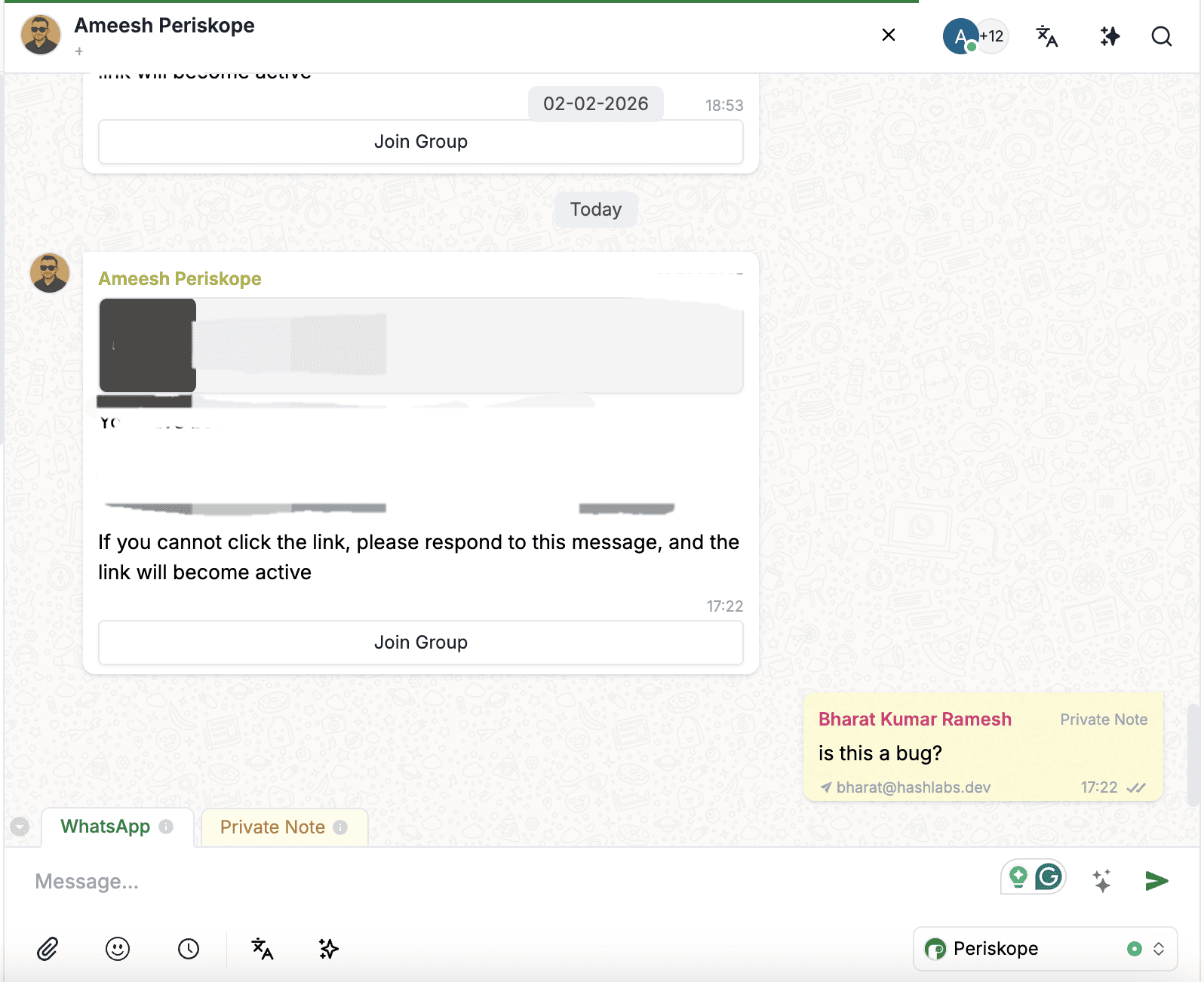
The AI agent adds invisible notes to conversations that only your team can see.

When a human agent takes over the conversation, they see the complete context. No need to ask customers to repeat themselves.

Send private notes to team members

Where notes appear:

  • Inside the chat thread as Private Notes (highlighted in yellow and visible only to your team)

  • In your connected CRM (if you've set up integration)

Example:

A sales rep opens a customer conversation in HubSpot. They immediately see the AI's note: "Customer asked about annual pricing discount on Feb 2. Interested in 50+ seat license."

The sales rep jumps straight into the proposal. No back-and-forth to gather basic information.

💡 See It in Action

Book a 30-minute demo and watch the AI handle real customer conversations.

Once you've set up the AI agent, it handles three core tasks without any manual work from your team.

1. Auto-Respond to Customer Queries

When a customer asks a question in your WhatsApp group or chat, Periskope's AI agent scans your knowledge base and responds instantly.

How it works:

A customer asks: "What are your pricing plans?"

The AI searches your uploaded FAQs and documents, finds the pricing information, and sends the answer—usually within 3 seconds.

The AI then stays active in the conversation to handle follow-up questions.

What makes it unique:

The AI bot doesn't use keyword matching. It understands intent.

If someone says "ok" or "thanks," the AI stays quiet. It only responds to genuine questions that need answers.

If someone asks "How much does the pro plan cost?" and "Do you offer discounts?" in the same message, the AI addresses both questions.

Real use case:

A SaaS company uses Periskope to handle product questions across 30 client WhatsApp groups. The AI answers "How do I export data?" and "What file formats do you support?" automatically. Their support team went from answering 200 repetitive questions per week to zero.

2. Create Support Tickets Automatically

Not every question has a simple answer. When the WhatsApp AI agent can't find relevant information in your knowledge base, it escalates intelligently.

What happens:

  • Customer reports a bug: "The login page isn't loading"

  • AI searches the knowledge base but finds no solution

  • AI creates a support ticket in Periskope's system

  • AI assigns the ticket to the right team member (based on roles you define)

  • Customer gets notified: "I've alerted our technical team about this issue"

Smart routing:

You define team roles when setting up the AI agent:

  • Technical issues → Engineering team

  • Billing questions → Finance team

  • Feature requests → Product team

  • Pricing inquiries → Sales team

The AI reads the message, understands the issue type, and routes the ticket to the right person. This ensures that every issue gets logged and assigned, even when your team is offline or busy.

3. Add Private Notes for Team Context

The AI agent adds invisible notes to conversations that only your team can see.

When a human agent takes over the conversation, they see the complete context. No need to ask customers to repeat themselves.

Send private notes to team members

Where notes appear:

  • Inside the chat thread as Private Notes (highlighted in yellow and visible only to your team)

  • In your connected CRM (if you've set up integration)

Example:

A sales rep opens a customer conversation in HubSpot. They immediately see the AI's note: "Customer asked about annual pricing discount on Feb 2. Interested in 50+ seat license."

The sales rep jumps straight into the proposal. No back-and-forth to gather basic information.

💡 See It in Action

Book a 30-minute demo and watch the AI handle real customer conversations.

Sync Periskope’s WhatsApp AI Agent with Your CRM

Periskope automatically syncs everything to your existing systems.

Supported CRM Integrations

Periskope connects with:

  • HubSpot - Contacts, tickets, conversation logs

  • Zoho CRM - Leads, deals, support tickets

  • Google Sheets - Custom data exports, reporting

  • Freshdesk - Support tickets, customer profiles

What Syncs Automatically

1. Conversation transcripts - Every WhatsApp message flows to your CRM. Your sales and support teams see complete conversation history.

2. Support tickets - When the AI creates a ticket, it appears in your CRM immediately with full context.

3. Private notes - The AI's context notes sync alongside conversations. Your team sees customer history without digging through WhatsApp.

4. Customer data - Contact information, preferences, interaction timestamps—all updated in real-time.

How it Works in Practice

⫸ Example: E-commerce support workflow

  1. Customer asks in WhatsApp: "Where's my order #12345?"

  2. Periskope's AI searches the knowledge base, finds tracking info, and responds

  3. Conversation syncs to Freshdesk as a closed support ticket

  4. If the customer replies, "It's still not here," AI creates a new ticket and assigns it to the support team

  5. Support agent opens Freshdesk, sees the entire conversation history, and processes the refund

⫸ Example: B2B sales workflow

  1. Lead asks in WhatsApp: "What's the pricing for 100 users?"

  2. AI responds with pricing tiers from the knowledge base

  3. Conversation syncs to HubSpot, tagged as "Sales Inquiry - Enterprise"

  4. Sales rep sees conversation in HubSpot alongside the lead's company info

  5. Rep follows up with personalized proposal—no need to ask lead to repeat requirements

Without integration, your team copies information manually between WhatsApp and your CRM. Things get missed. Context gets lost.

With Periskope, everything flows automatically. Your team works from one system. Customer data stays complete and up-to-date.


Who Should Use AI Agents on WhatsApp Business?

Periskope's WhatsApp AI chatbot is ideal for:

✅ E-commerce businesses - Automate order tracking, return policies, and product FAQs on customer support groups.

✅ Service providers - Handle appointment booking, service availability, and scheduling queries automatically.

✅ B2B companies - Use automated WhatsApp responses to manage multiple client WhatsApp groups for sales, support, and operations at scale.

✅ Customer support teams - Reduce workload from repetitive questions like password resets and account issues.

✅ Sales teams - Qualify leads and answer pricing questions 24/7 without manual intervention.

✅ Operations teams - Coordinate projects and answer process questions across multiple WhatsApp groups.


FAQs

1. How do I add an AI chatbot to my WhatsApp Business?

Sign up for Periskope, scan the QR code to connect your WhatsApp number, enable the AI agent in Settings > AI > Controls, and upload your knowledge base (FAQs or documents).

2. Do I need WhatsApp Business API for an AI chatbot?

Not with Periskope. The AI agent works with regular WhatsApp numbers and WhatsApp Business app numbers. You don't need to apply for API access or wait for Meta approval.

3. What is the best WhatsApp AI chatbot?

Periskope is a WhatsApp AI chatbot that deploys in under 5 minutes without requiring API access. It offers intelligent activation, automatic ticket creation, and CRM sync with HubSpot, Zoho, Google Sheets, and Freshdesk.

4. Can a WhatsApp AI chatbot create support tickets?

Yes. Periskope's AI agent automatically creates support tickets when it can't answer a customer query from your knowledge base.

It assigns tickets to the right team member based on issue type and notifies the customer that their request has been escalated.

5. How does an AI WhatsApp chatbot differ from auto-responders?

Auto-responders send the same pre-written message to everyone based on keywords.

WhatsApp AI automation platforms like Periskope understand context, search your knowledge base for specific answers, and make intelligent decisions about when to respond versus when to escalate to humans.

6. Is there a free WhatsApp AI chatbot?

Periskope offers a free trial to test the AI agent features. You can check the full pricing details here.


Get Started with Periskope's AI Agent

Every hour spent on "What's your pricing?" or "How do I reset my password?" is an hour not spent closing deals or solving real problems.

Periskope's AI agent handles the repetitive work. Let your team focus on what actually matters.

Join 5,000+ businesses using Periskope to automate WhatsApp support, sales, and operations today.

→ Start Your Free Trial - Deploy the AI agent in your WhatsApp groups today. See the difference in 24 hours.

→ Book a Demo - Not sure if it fits your workflow? Talk to our team. We'll show you exactly how Periskope works for businesses like yours.

Periskope automatically syncs everything to your existing systems.

Supported CRM Integrations

Periskope connects with:

  • HubSpot - Contacts, tickets, conversation logs

  • Zoho CRM - Leads, deals, support tickets

  • Google Sheets - Custom data exports, reporting

  • Freshdesk - Support tickets, customer profiles

What Syncs Automatically

1. Conversation transcripts - Every WhatsApp message flows to your CRM. Your sales and support teams see complete conversation history.

2. Support tickets - When the AI creates a ticket, it appears in your CRM immediately with full context.

3. Private notes - The AI's context notes sync alongside conversations. Your team sees customer history without digging through WhatsApp.

4. Customer data - Contact information, preferences, interaction timestamps—all updated in real-time.

How it Works in Practice

⫸ Example: E-commerce support workflow

  1. Customer asks in WhatsApp: "Where's my order #12345?"

  2. Periskope's AI searches the knowledge base, finds tracking info, and responds

  3. Conversation syncs to Freshdesk as a closed support ticket

  4. If the customer replies, "It's still not here," AI creates a new ticket and assigns it to the support team

  5. Support agent opens Freshdesk, sees the entire conversation history, and processes the refund

⫸ Example: B2B sales workflow

  1. Lead asks in WhatsApp: "What's the pricing for 100 users?"

  2. AI responds with pricing tiers from the knowledge base

  3. Conversation syncs to HubSpot, tagged as "Sales Inquiry - Enterprise"

  4. Sales rep sees conversation in HubSpot alongside the lead's company info

  5. Rep follows up with personalized proposal—no need to ask lead to repeat requirements

Without integration, your team copies information manually between WhatsApp and your CRM. Things get missed. Context gets lost.

With Periskope, everything flows automatically. Your team works from one system. Customer data stays complete and up-to-date.


Who Should Use AI Agents on WhatsApp Business?

Periskope's WhatsApp AI chatbot is ideal for:

✅ E-commerce businesses - Automate order tracking, return policies, and product FAQs on customer support groups.

✅ Service providers - Handle appointment booking, service availability, and scheduling queries automatically.

✅ B2B companies - Use automated WhatsApp responses to manage multiple client WhatsApp groups for sales, support, and operations at scale.

✅ Customer support teams - Reduce workload from repetitive questions like password resets and account issues.

✅ Sales teams - Qualify leads and answer pricing questions 24/7 without manual intervention.

✅ Operations teams - Coordinate projects and answer process questions across multiple WhatsApp groups.


FAQs

1. How do I add an AI chatbot to my WhatsApp Business?

Sign up for Periskope, scan the QR code to connect your WhatsApp number, enable the AI agent in Settings > AI > Controls, and upload your knowledge base (FAQs or documents).

2. Do I need WhatsApp Business API for an AI chatbot?

Not with Periskope. The AI agent works with regular WhatsApp numbers and WhatsApp Business app numbers. You don't need to apply for API access or wait for Meta approval.

3. What is the best WhatsApp AI chatbot?

Periskope is a WhatsApp AI chatbot that deploys in under 5 minutes without requiring API access. It offers intelligent activation, automatic ticket creation, and CRM sync with HubSpot, Zoho, Google Sheets, and Freshdesk.

4. Can a WhatsApp AI chatbot create support tickets?

Yes. Periskope's AI agent automatically creates support tickets when it can't answer a customer query from your knowledge base.

It assigns tickets to the right team member based on issue type and notifies the customer that their request has been escalated.

5. How does an AI WhatsApp chatbot differ from auto-responders?

Auto-responders send the same pre-written message to everyone based on keywords.

WhatsApp AI automation platforms like Periskope understand context, search your knowledge base for specific answers, and make intelligent decisions about when to respond versus when to escalate to humans.

6. Is there a free WhatsApp AI chatbot?

Periskope offers a free trial to test the AI agent features. You can check the full pricing details here.


Get Started with Periskope's AI Agent

Every hour spent on "What's your pricing?" or "How do I reset my password?" is an hour not spent closing deals or solving real problems.

Periskope's AI agent handles the repetitive work. Let your team focus on what actually matters.

Join 5,000+ businesses using Periskope to automate WhatsApp support, sales, and operations today.

→ Start Your Free Trial - Deploy the AI agent in your WhatsApp groups today. See the difference in 24 hours.

→ Book a Demo - Not sure if it fits your workflow? Talk to our team. We'll show you exactly how Periskope works for businesses like yours.

Automate your WhatsApp with Periskope

Automate your WhatsApp with Periskope

Automate your WhatsApp with Periskope