
Choosing the Right WhatsApp Group Software for Your Business
Discover the best WhatsApp group software for your business. This guide covers features, use cases, and how to choose the right tool to scale team workflows.
Jan 29, 2026

This guide is for teams evaluating WhatsApp group software to fix their disorganized customer chats, sales DMs, and operational messages. It breaks down the essential features, use cases, and evaluation criteria to help you choose a tool that organizes communication and scales with your business.
What Is WhatsApp Group Software?
WhatsApp group software is a tool that centralizes conversations from multiple WhatsApp numbers and groups into a single, shared inbox. It turns the standard, personal WhatsApp app into a professional, collaborative platform for business use.
For teams running operations on the regular app, communication is a black box. Managers have no visibility into conversations, agents can't collaborate on inquiries, and there's no way to track performance. The software solves this by providing a unified dashboard for your entire team.
Who is this software for?
This tool is designed for businesses that rely on WhatsApp for customer support, sales, or field operations and have hit the limits of the standard app. If you're struggling with lost messages, slow response times, and a lack of oversight, you need this software.
Who it’s for: Customer support teams, sales reps, field operations coordinators, and community managers who handle high volumes of WhatsApp messages.
Who it’s not for: Individuals or small teams with very low message volume who can easily manage chats from a single phone.
The core problem it solves
WhatsApp group software brings structure, accountability, and visibility to a communication channel that is otherwise chaotic for business use. It directly addresses these common pain points:
Lost Opportunities: Customer inquiries get buried in cluttered group chats, leading to lost revenue.
Zero Oversight: Managers can't monitor agent performance, ensure brand consistency, or provide coaching.
Inefficient Workflows: Agents waste time forwarding screenshots and manually tracking tasks, slowing down operations.
Inability to Scale: Adding more agents or groups multiplies the chaos instead of improving capacity.
A dedicated platform transforms WhatsApp from a personal messaging app into a scalable operations hub, giving you the control and automation needed to manage high-volume communications.
With over 3 billion monthly active users, WhatsApp is a primary business channel in major markets like Brazil (91% adoption) and Kenya (97% adoption). You can learn more about WhatsApp's business impact from recent statistics. Centralizing these interactions creates a single source of truth for your customer-facing teams.
Core Features of WhatsApp Group Software
Effective WhatsApp management tools provide the structure to handle conversations professionally. The goal isn't just to see all messages in one place, but to organize, track, and automate communication. These are the non-negotiable features you should look for.
1. Multi-Number Shared Inbox
This is the foundation. A shared inbox pulls all messages—from both group chats and direct messages—from multiple phone numbers into one unified dashboard. This eliminates the need to juggle devices and provides a single view of all customer communication for the entire team.
2. Role-Based Permissions and Controls
When multiple team members access customer chats, clear permissions are essential for security and accountability.
Agents: Can be assigned specific groups or chats to focus their work.
Managers: Get a complete overview to monitor performance, assist agents, and reassign conversations.
Admins: Control system-wide settings, user access, and integrations.
This structure prevents unauthorized access, protects customer data, and establishes clear lines of responsibility.
3. Analytics and Performance Tracking
The standard WhatsApp app provides no useful business data. A proper software solution includes an analytics dashboard to track key performance indicators (KPIs) that matter.
Average response time
Resolution rate
Message volume per agent
Peak traffic hours
This data allows managers to optimize team performance, identify training needs, and make data-driven staffing decisions.
4. Automation and Intelligent Routing
Manual tasks are the enemy of scale. Automation features help your team manage high message volumes efficiently.
Auto-Replies: Instantly acknowledge messages, set response time expectations, and handle after-hours inquiries.
Chat Routing: Automatically assign new conversations to the right agent or team based on keywords or other predefined rules.
SLA Alerts: Notify a manager if a message remains unanswered for too long, ensuring no customer is ignored.
For more on this, see how to set up automated replies on WhatsApp groups.
5. Ticketing and Task Management
Many WhatsApp messages are not just chats—they are tasks that need action. A built-in ticketing system allows agents to convert any message into a trackable ticket. This assigns clear ownership and a status (e.g., Open, In Progress, Resolved), ensuring every request is handled from start to finish.
Common Use Cases for WhatsApp Group Software
The right software transforms a chaotic channel into a structured workspace, driving business results across different departments. Here’s how teams use it in practice.
Customer Support
Support teams use the software to manage high volumes of inquiries without missing messages or making customers wait.
When to use: You need to track Service Level Agreements (SLAs), create and manage tickets from chats, and balance workloads among agents.
How it helps: Automated alerts ping managers if a query isn't answered in time. Messages are converted into trackable tickets with clear owners. A central dashboard allows for easy reassignment of chats to prevent agent burnout.
Sales
Sales managers need visibility into conversations happening on reps' personal or company WhatsApp numbers to provide coaching and track deals.
When to use: You need to monitor conversations, ensure pipeline accuracy, and analyze sales performance.
How it helps: Managers can review chat histories to provide targeted coaching. CRM integration logs every WhatsApp chat against the contact record, creating a complete interaction history. Analytics track lead response times and follow-up frequency.
Field Operations
For logistics, maintenance, or delivery teams, coordination is critical. A shared platform acts as a command center for field operations.
When to use: You need a single source of truth for dispatching jobs, receiving real-time updates from the field, and tracking task completion.
How it helps: Dispatchers can assign tasks directly from a customer message. Field agents can provide updates with photos and location pins. Managers can track progress in real-time, creating a clean, auditable trail for every job.
Community Management
Managing large communities or educational cohorts in WhatsApp groups requires tools for engagement and moderation.
When to use: You need to schedule announcements, monitor engagement, and moderate conversations across multiple large groups.
How it helps: Schedule broadcasts to send important information at the optimal time. Use analytics to identify active members and trending topics. A centralized view makes it easy to spot and address inappropriate content. You can even summarize WhatsApp group chats with AI to keep up with busy conversations.
How to Choose the Right Software
Selecting the right WhatsApp group software is a critical decision that impacts team efficiency and customer experience. It’s about finding a platform that solves your current problems and scales with your business. Use these criteria to evaluate your options.
1. Scalability
The software must grow with you. A tool that works for five agents should work just as well for fifty.
Agent Count: Does the pricing model scale fairly as you add team members?
Message Volume: Can the system handle thousands of daily messages without performance issues?
Account Limits: How many phone numbers can you connect? The ability to manage multiple WhatsApp accounts is crucial for businesses with different brands or regions.
2. Integrations
The software must connect with your existing tools to avoid creating another data silo. Manual data entry is slow and prone to errors.
CRM: Native integrations with tools like HubSpot or Zoho are essential for logging customer interactions.
Helpdesk: Connections to systems like Freshdesk allow agents to convert WhatsApp chats into formal support tickets.
Workflow Automation: Look for connections to tools like Zapier or Make to build custom workflows. For more ideas, check out the best AI workflow automation tools.
3. Security and Compliance
You are entrusting a third-party platform with sensitive customer conversations. Security is non-negotiable.
Role-Based Permissions: Granular controls to define who can see and do what.
Data Encryption: End-to-end encryption for all messages, both in transit and at rest.
GDPR Compliance: A must-have if you operate in Europe.
Activity Logs: An audit trail that logs all user actions for accountability.
4. User Experience (UX)
A complex tool won't get used. The software should be intuitive, with a clean interface that requires minimal training. Fast onboarding is key—your team should be productive within minutes, not days. A positive user experience drives adoption and ensures a return on your investment.
Software Evaluation Checklist
Use this table to compare potential solutions and make an informed decision.
Evaluation Criteria | What to Look For | Why It Matters |
|---|---|---|
Scalability | Agent/number limits, message volume capacity, multi-account support. | Ensures the tool grows with your business, preventing costly migrations later. |
Integrations | Native connections to your CRM, helpdesk, and collaboration tools. | Automates workflows and creates a single source of truth for customer data. |
Security & Compliance | Role-based permissions, data encryption, GDPR adherence, audit logs. | Protects sensitive customer data and avoids legal and financial penalties. |
User Experience (UX) | Intuitive interface, minimal training needed, fast onboarding process. | Drives high team adoption and maximizes the return on your investment. |
Automation | Rule-based routing, automated replies, AI-powered ticket creation. | Frees up your team from repetitive tasks to focus on high-value conversations. |
Analytics & Reporting | Dashboards for response times, message volume, and agent performance. | Provides actionable insights to optimize your support and sales processes. |
How to Implement Your New WhatsApp Workflow
Choosing the software is the first step. Proper implementation is what delivers the return on investment. Follow these steps to get your new system running smoothly from day one.
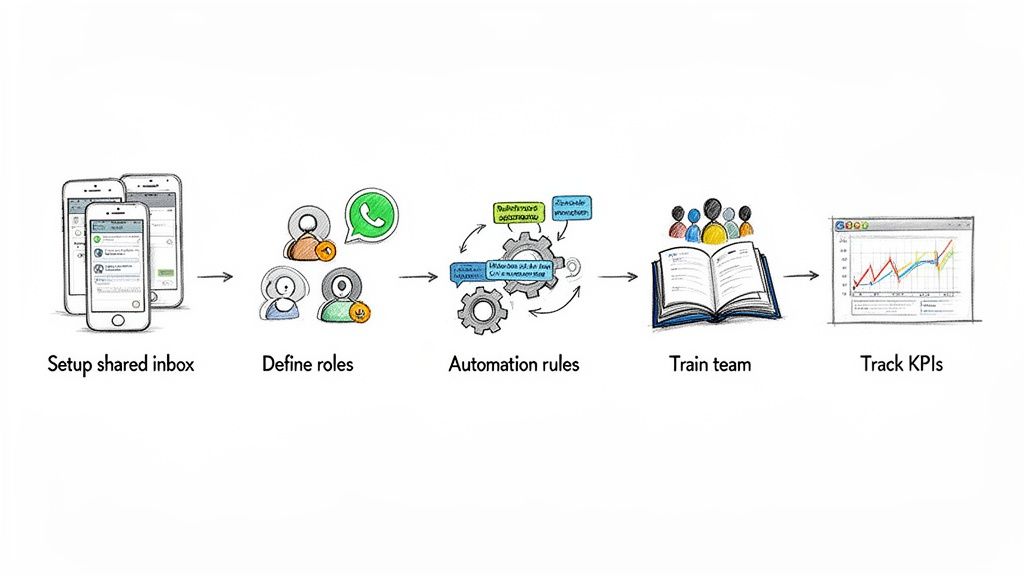
Step 1: Set Up the Shared Inbox and Define Roles
First, connect all your business WhatsApp numbers to the central dashboard. Then, define roles and permissions to create clear ownership for every conversation. This eliminates the "someone else will handle it" problem common in disorganized group chats.
Agents: Assign them to specific groups or chat types to reduce noise and improve focus.
Managers: Grant them oversight across all conversations to monitor performance and provide support.
Administrators: Give them control over system settings, integrations, and user accounts.
Step 2: Configure Your First Automation Rules
Automation saves time and ensures consistency. Start with a few simple rules to handle your most repetitive tasks.
Welcome Auto-Reply: Set up an instant reply to acknowledge new messages and set response time expectations.
Keyword-Based Routing: Automatically assign chats containing words like "pricing," "demo," or "bug" to the appropriate team.
SLA Alerts: Create a rule to notify a manager if a message isn't answered within a set time (e.g., 30 minutes).
The scale of WhatsApp, with over 60 billion messages sent daily, makes automation essential for businesses to keep up. You can find more data in these insightful statistics.
Step 3: Train Your Team and Track KPIs
Train your team on the new workflow, not just the software features. Emphasize collaborative tools like internal notes and ticketing to replace inefficient habits like forwarding screenshots.
Once your team is onboarded, use the analytics dashboard to track KPIs that align with your business goals. Monitor metrics like average response time, first-contact resolution, and conversations per agent. This data provides objective insight into team performance and demonstrates the ROI of your new whatsapp group software.
Final Takeaway: Stop Flying Blind on WhatsApp
Using the standard WhatsApp app for business is inefficient and unscalable. It creates communication black boxes that lead to missed sales, poor customer service, and operational bottlenecks. You cannot measure performance, enforce standards, or scale your team effectively.
WhatsApp group software solves this by transforming the chaotic channel into a structured, measurable, and collaborative operations hub. It provides the visibility, control, and automation needed to manage customer communications professionally without the complexity and restrictions of the official WhatsApp Business API.
With the right tool, you get:
Total Visibility: A single dashboard for every conversation across all numbers.
Team Collaboration: Shared inbox, internal notes, and ticketing features.
Performance Metrics: Actionable data on response times and resolution rates.
Your next step is to audit your current WhatsApp pain points. Identify where messages are getting lost and where your team is wasting time. Then, find a platform like Periskope that directly solves those problems by centralizing your communications without requiring you to change your existing phone numbers. The goal is to remove operational friction and empower your team to work more effectively.
Frequently Asked Questions
Here are answers to common questions about using WhatsApp group software. For additional help, many platforms offer a dedicated section for frequently asked questions.
Do I need the WhatsApp Business API to use this software?
No. A key advantage of this type of software is that it works without the official Business API. You connect your existing phone numbers directly to a shared dashboard, allowing setup in minutes instead of weeks. This approach bypasses the complex API approval process and restrictive message template rules, enabling more natural, human conversations.
Can I track my team's performance with this software?
Yes. This is a core function. While the native WhatsApp app offers no performance data, WhatsApp group software includes detailed analytics dashboards. You can track essential metrics like average response time, resolution rate, and conversation volume per agent. This data is critical for managing team performance and improving customer service.
How does this software handle privacy for multiple agents?
Security is a primary feature. Platforms use role-based permissions to control who can access what. For example, an agent may only see their assigned conversations, while a manager has a complete overview. Other essential privacy features include private internal notes for team collaboration, detailed activity logs (audit trails), and compliance with regulations like GDPR.
Can I automate responses and workflows?
Yes. Automation is crucial for scaling your operations. You can set up simple auto-replies for after-hours messages or build more advanced workflows, such as automatically routing chats to the right team based on keywords. This reduces manual work, ensures fast, consistent responses, and helps your team manage high message volumes without being overwhelmed.
Ready to transform your chaotic WhatsApp groups into a structured, scalable operations hub? Periskope provides the shared inbox, ticketing, and automation you need to gain full visibility and control. Start managing your WhatsApp communications more effectively today.
Automate your WhatsApp with Periskope

Features
Integrations


