Features

Integrations

Case Studies

Resources

WATI vs Periskope: Which Tool Handles Operations Workflows Better?

WATI vs Periskope: Which Tool Handles Operations Workflows Better?

WATI vs Periskope: Which Tool Handles Operations Workflows Better?

WATI vs Periskope: Which Tool Handles Operations Workflows Better?

Anjali Pandey

Feb 23, 2026

WATI is a popular WhatsApp Business API platform used by marketing teams and e-commerce businesses.

But if your operations team coordinates through WhatsApp groups, WATI won't work.

WATI's documentation states: "WATI does not support sending messages to WhatsApp groups." Additionally, WATI requires a new WhatsApp Business API number—you can't use your existing WhatsApp number with established client relationships and conversation history.

Operations teams work through WhatsApp groups and rely on their existing numbers. They coordinate client projects, vendor relationships, and enterprise bookings through them.

Without group access and the ability to use existing numbers, WATI can't support operations workflows.

This guide compares WATI and Periskope for operations teams. You'll see exactly where WATI falls short for operations, what operations teams need, and how Periskope serves as the best WATI alternative for WhatsApp group management.

WATI is a popular WhatsApp Business API platform used by marketing teams and e-commerce businesses.

But if your operations team coordinates through WhatsApp groups, WATI won't work.

WATI's documentation states: "WATI does not support sending messages to WhatsApp groups." Additionally, WATI requires a new WhatsApp Business API number—you can't use your existing WhatsApp number with established client relationships and conversation history.

Operations teams work through WhatsApp groups and rely on their existing numbers. They coordinate client projects, vendor relationships, and enterprise bookings through them.

Without group access and the ability to use existing numbers, WATI can't support operations workflows.

This guide compares WATI and Periskope for operations teams. You'll see exactly where WATI falls short for operations, what operations teams need, and how Periskope serves as the best WATI alternative for WhatsApp group management.

TL;DR: WATI vs Periskope for Operations Teams

What Operations Teams Need

WATI

Periskope

WhatsApp Group Access

❌ Not supported

✅ Manage 1,000+ groups

Use Existing WhatsApp Number

❌ No (requires API number)

✅ Yes (connect via QR code)

Group Message Ticketing

❌ No

✅ Automatic ticket creation

SLA Tracking & Escalations

❌ Manual only

✅ Automated with alerts

Multi-Party Coordination

⚠️ 1-to-1 focus

✅ Built for groups

Primary Use Case

Marketing

Operations & group coordination (client projects, customer support, sales ops, internal teams)

Best For

E-commerce, marketing campaigns

Client projects, vendor management, enterprise bookings

Bottom line: WATI doesn't support WhatsApp groups or regular WhatsApp numbers. If you coordinate through groups or rely on your existing WhatsApp number, WATI can't support your workflow.

What Operations Teams Need

WATI

Periskope

WhatsApp Group Access

❌ Not supported

✅ Manage 1,000+ groups

Use Existing WhatsApp Number

❌ No (requires API number)

✅ Yes (connect via QR code)

Group Message Ticketing

❌ No

✅ Automatic ticket creation

SLA Tracking & Escalations

❌ Manual only

✅ Automated with alerts

Multi-Party Coordination

⚠️ 1-to-1 focus

✅ Built for groups

Primary Use Case

Marketing

Operations & group coordination (client projects, customer support, sales ops, internal teams)

Best For

E-commerce, marketing campaigns

Client projects, vendor management, enterprise bookings

Bottom line: WATI doesn't support WhatsApp groups or regular WhatsApp numbers. If you coordinate through groups or rely on your existing WhatsApp number, WATI can't support your workflow.

What Operations Teams Need

WATI

Periskope

WhatsApp Group Access

❌ Not supported

✅ Manage 1,000+ groups

Use Existing WhatsApp Number

❌ No (requires API number)

✅ Yes (connect via QR code)

Group Message Ticketing

❌ No

✅ Automatic ticket creation

SLA Tracking & Escalations

❌ Manual only

✅ Automated with alerts

Multi-Party Coordination

⚠️ 1-to-1 focus

✅ Built for groups

Primary Use Case

Marketing

Operations & group coordination (client projects, customer support, sales ops, internal teams)

Best For

E-commerce, marketing campaigns

Client projects, vendor management, enterprise bookings

Bottom line: WATI doesn't support WhatsApp groups or regular WhatsApp numbers. If you coordinate through groups or rely on your existing WhatsApp number, WATI can't support your workflow.

Understanding the Difference: Marketing vs Operations Workflows

Most WhatsApp tools are built for one of two use cases. Understanding which one you need determines which tool fits.

1. Marketing Workflows

These workflows focus on sending messages to customers at scale.

What this looks like:

  • Broadcast promotional messages to thousands of customers

  • Send automated order confirmations and shipping updates

  • Run Click-to-WhatsApp ads that start chatbot conversations

  • Nurture leads through drip campaigns

  • Recover abandoned carts with reminder messages

  • Handle customer support through chatbot FAQs

Who uses this:

→ E-commerce businesses

→ Marketing teams running campaigns

→ Customer support teams handling high ticket volumes

→ D2C brands doing promotional broadcasts

2. Operations Workflows

These workflows focus on coordinating through WhatsApp groups for client work, customer support, sales, and internal operations.

What this looks like:

  • Manage client projects through dedicated groups 

  • Coordinate with vendors across supplier groups 

  • Handle customer support queries in group settings 

  • Sales teams coordinating complex deals with multiple stakeholders 

  • Internal cross-functional team coordination

Who uses this:

→ Operations teams at B2B companies

→ Customer support teams managing group-based support

→ Sales teams coordinating complex deals

→ Internal teams collaborating across departments

→ Travel and hospitality coordinators

→ Real estate agencies

→ Logistics and supply chain teams

Why This Distinction Matters

WATI uses WhatsApp Business API. The API was designed for marketing broadcasts and customer support. It handles 1-to-1 conversations at scale. It has chatbot automation.

But it doesn't support WhatsApp groups. This is a fundamental limitation of the technology.

Periskope uses regular WhatsApp through WhatsApp Web's multi-device protocol. This gives it full access to WhatsApp groups. You can manage hundreds or thousands of groups from one dashboard.

The tradeoff: Periskope doesn't have a green verification checkmark or Click-to-WhatsApp ads. Those require the Business API.

For operations teams, this tradeoff makes sense. They need group access, not ads or verification.

Learn more about how to use WhatsApp without API here.

Most WhatsApp tools are built for one of two use cases. Understanding which one you need determines which tool fits.

1. Marketing Workflows

These workflows focus on sending messages to customers at scale.

What this looks like:

  • Broadcast promotional messages to thousands of customers

  • Send automated order confirmations and shipping updates

  • Run Click-to-WhatsApp ads that start chatbot conversations

  • Nurture leads through drip campaigns

  • Recover abandoned carts with reminder messages

  • Handle customer support through chatbot FAQs

Who uses this:

→ E-commerce businesses

→ Marketing teams running campaigns

→ Customer support teams handling high ticket volumes

→ D2C brands doing promotional broadcasts

2. Operations Workflows

These workflows focus on coordinating through WhatsApp groups for client work, customer support, sales, and internal operations.

What this looks like:

  • Manage client projects through dedicated groups 

  • Coordinate with vendors across supplier groups 

  • Handle customer support queries in group settings 

  • Sales teams coordinating complex deals with multiple stakeholders 

  • Internal cross-functional team coordination

Who uses this:

→ Operations teams at B2B companies

→ Customer support teams managing group-based support

→ Sales teams coordinating complex deals

→ Internal teams collaborating across departments

→ Travel and hospitality coordinators

→ Real estate agencies

→ Logistics and supply chain teams

Why This Distinction Matters

WATI uses WhatsApp Business API. The API was designed for marketing broadcasts and customer support. It handles 1-to-1 conversations at scale. It has chatbot automation.

But it doesn't support WhatsApp groups. This is a fundamental limitation of the technology.

Periskope uses regular WhatsApp through WhatsApp Web's multi-device protocol. This gives it full access to WhatsApp groups. You can manage hundreds or thousands of groups from one dashboard.

The tradeoff: Periskope doesn't have a green verification checkmark or Click-to-WhatsApp ads. Those require the Business API.

For operations teams, this tradeoff makes sense. They need group access, not ads or verification.

Learn more about how to use WhatsApp without API here.

Try Periskope

Manage WhatsApp Groups, Chats and Numbers at Scale

Why WATI Doesn't Work for Operations Teams: 4 Critical Gaps

For operations teams, four fundamental gaps make WATI the wrong choice.

1. No WhatsApp Group Support

WATI's official documentation states: "No, WATI does not support sending messages to WhatsApp groups. Instead, you can use the broadcast feature to send messages to specific contacts."

What this means:

  • Can't access existing client coordination groups

  • Can't manage vendor relationship groups

  • Can't participate in multi-party project groups

  • Can't create tickets from group messages

  • Zero visibility into group conversations

The broadcast workaround doesn't help. Broadcasting sends individual messages to multiple people separately. The customer can't see the hotel's response. The hotel can't see the customer's questions. Nobody can coordinate.

If your operations run through WhatsApp groups, WATI doesn't work.

2. Can't Use Your Existing WhatsApp Number

WATI requires a WhatsApp Business API number. You can't connect your existing WhatsApp number.

Why this matters for sales teams: If you've built client relationships on your current WhatsApp number over months or years, you can't migrate it to WATI. You'd need to ask all contacts to save a new number. You lose all conversation history.

For relationship-based sales where continuity matters, this kills trust.

Why this matters for operations: Your team already coordinates through your current number. You have established groups with clients and vendors. WATI forces you to start from scratch with a new number. Your existing groups stay on your old number, which WATI can't access anyway.

Periskope connects to your existing WhatsApp number via QR code. Your groups, contacts, and conversation history stay intact. Your team gets immediate access.

3. No SLA Tracking or Automatic Escalations

Operations teams have time-sensitive commitments. Example -  A hotel booking needs confirmation within 2 hours. A vendor delay needs immediate attention. A VIP client expects responses in 15 minutes.

WATI has a shared team inbox where you can assign conversations to team members and add tags. But there's no SLA automation.

What's missing:

  • Can't set response time thresholds

  • No automatic escalations when deadlines are missed

  • No real-time alerts to managers

  • No SLA compliance dashboards

You're managing SLAs manually. Someone has to watch the clock and remember to escalate.

For operations teams handling dozens or hundreds of time-sensitive requests daily, this doesn't scale.

Periskope lets you set SLA thresholds per group or client type. If a message goes unanswered for 15 minutes, it automatically escalates to a manager group. You get real-time breach alerts. Your dashboard shows SLA compliance rates.

4. Built for 1-to-1, Not Multi-Party Coordination

WATI's shared inbox is designed for customer support queues. One agent picks up one customer conversation.

Operations teams work differently.

Most operational communication involves 3+ parties:

  • Client + Vendor + Internal Ops Team

  • Customer + Multiple Service Providers + Account Manager

  • Buyer + Seller + Broker (real estate)

  • Patient + Doctor + Insurance Coordinator (healthcare)

These conversations happen in WhatsApp groups. Everyone needs to see the full context. The client's question, the vendor's answer, the ops team's internal note.

WATI's 1-to-1 conversation model doesn't map to this reality. Even if you could access groups (you can't), the inbox isn't designed for multi-party coordination.

These limitations are exactly why many operations teams start searching for WATI alternatives that actually support group-based workflows.

For operations teams, four fundamental gaps make WATI the wrong choice.

1. No WhatsApp Group Support

WATI's official documentation states: "No, WATI does not support sending messages to WhatsApp groups. Instead, you can use the broadcast feature to send messages to specific contacts."

What this means:

  • Can't access existing client coordination groups

  • Can't manage vendor relationship groups

  • Can't participate in multi-party project groups

  • Can't create tickets from group messages

  • Zero visibility into group conversations

The broadcast workaround doesn't help. Broadcasting sends individual messages to multiple people separately. The customer can't see the hotel's response. The hotel can't see the customer's questions. Nobody can coordinate.

If your operations run through WhatsApp groups, WATI doesn't work.

2. Can't Use Your Existing WhatsApp Number

WATI requires a WhatsApp Business API number. You can't connect your existing WhatsApp number.

Why this matters for sales teams: If you've built client relationships on your current WhatsApp number over months or years, you can't migrate it to WATI. You'd need to ask all contacts to save a new number. You lose all conversation history.

For relationship-based sales where continuity matters, this kills trust.

Why this matters for operations: Your team already coordinates through your current number. You have established groups with clients and vendors. WATI forces you to start from scratch with a new number. Your existing groups stay on your old number, which WATI can't access anyway.

Periskope connects to your existing WhatsApp number via QR code. Your groups, contacts, and conversation history stay intact. Your team gets immediate access.

3. No SLA Tracking or Automatic Escalations

Operations teams have time-sensitive commitments. Example -  A hotel booking needs confirmation within 2 hours. A vendor delay needs immediate attention. A VIP client expects responses in 15 minutes.

WATI has a shared team inbox where you can assign conversations to team members and add tags. But there's no SLA automation.

What's missing:

  • Can't set response time thresholds

  • No automatic escalations when deadlines are missed

  • No real-time alerts to managers

  • No SLA compliance dashboards

You're managing SLAs manually. Someone has to watch the clock and remember to escalate.

For operations teams handling dozens or hundreds of time-sensitive requests daily, this doesn't scale.

Periskope lets you set SLA thresholds per group or client type. If a message goes unanswered for 15 minutes, it automatically escalates to a manager group. You get real-time breach alerts. Your dashboard shows SLA compliance rates.

4. Built for 1-to-1, Not Multi-Party Coordination

WATI's shared inbox is designed for customer support queues. One agent picks up one customer conversation.

Operations teams work differently.

Most operational communication involves 3+ parties:

  • Client + Vendor + Internal Ops Team

  • Customer + Multiple Service Providers + Account Manager

  • Buyer + Seller + Broker (real estate)

  • Patient + Doctor + Insurance Coordinator (healthcare)

These conversations happen in WhatsApp groups. Everyone needs to see the full context. The client's question, the vendor's answer, the ops team's internal note.

WATI's 1-to-1 conversation model doesn't map to this reality. Even if you could access groups (you can't), the inbox isn't designed for multi-party coordination.

These limitations are exactly why many operations teams start searching for WATI alternatives that actually support group-based workflows.

How Periskope Solves Operations Workflows (With Real Case Studies)
Periskope was built for operations teams coordinating through WhatsApp groups. Here's how it works:

1. Get Visibility Across All Your Groups

Your team manages dozens or hundreds of WhatsApp groups for client projects, vendor coordination, customer support, and internal ops. Right now, these groups are scattered across team members' phones with no visibility into what's pending.

What you get with Periskope:

One dashboard shows every group. Search for any conversation instantly. See which groups need attention. Jump into any conversation and respond. Your entire team sees the same view in real-time.

No more "did anyone respond to the client in that booking group?" No more scrolling through 47 unread groups looking for urgent requests.

Real impact: Treebo operations team manages 3,000+ enterprise booking groups from one dashboard. Every conversation is visible. Nothing gets missed.

See how they do it →

2. Stop Losing Critical Requests in Busy Groups

A client asks, "Can you confirm the delivery?" in a group with 50 messages that day. It gets buried under "thanks" and "got it." Two days later, the client is frustrated. You had no idea they were waiting.

This happens constantly when operations run through WhatsApp groups.

What you get with Periskope:

Automatic ticketing pulls important messages out of the noise. Set rules based on your workflow: "urgent," "payment issue," "delivery delay," client name, or any keyword. Periskope creates tickets automatically, assigns them, and tracks them until closed.

Your team sees one view: all open tickets across all groups. Clear ownership. Nothing falls through.

Real impact: Indonesian fintech processes 800+ customer queries daily on WhatsApp groups. Every payment issue auto-creates a ticket. Assigned to the right team instantly. Resolved within 15 minutes. See their workflow →

3. Meet Response Time Commitments Automatically

You promised VIP clients 15-minute response times. Your team is handling 50 groups simultaneously. Someone misses a message. You find out when the client escalates via email. The relationship is already strained.

Manual SLA tracking doesn't work when you're managing dozens of time-sensitive conversations.

What you get with Periskope:

Set response time thresholds by client type or urgency. VIP client: 10 minutes. Enterprise booking: 30 minutes. Standard query: 2 hours.

If a message goes unanswered past the threshold, Periskope escalates automatically. Sends alert to manager. Flags in the dashboard, and ensures someone picks it up immediately.

You see SLA compliance in real-time. Know when response times are slipping and fix issues before clients notice.

4. Give Your Team Access Without Adding 10 Numbers to Every Group

Your 10-person operations team needs to access client groups. You can't add 10 phone numbers to every group. Clients get confused. When someone’s on leave, conversations stop.

What you get with Periskope:

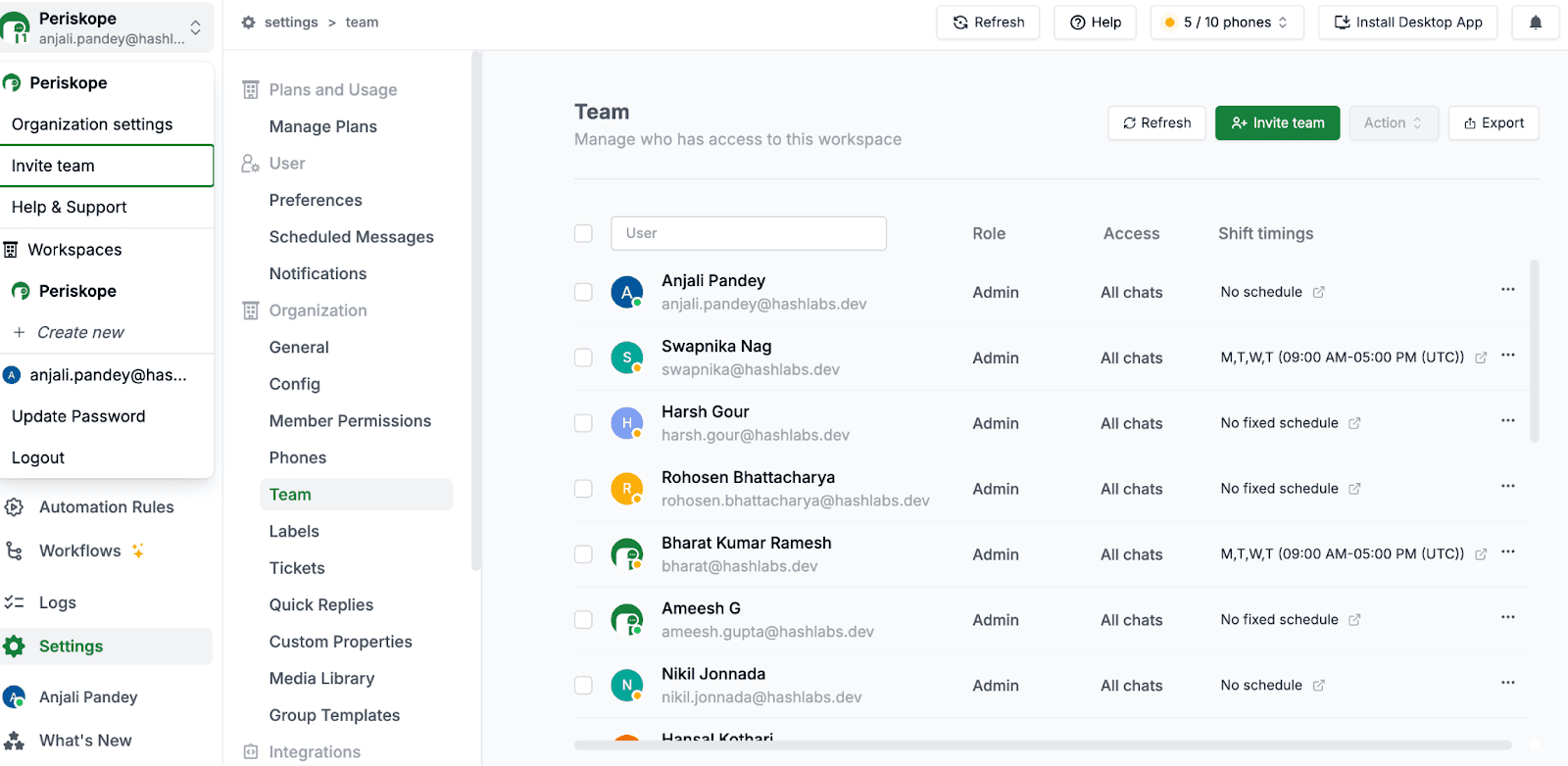
Team members log in with their email, see relevant groups based on their role, and respond from the dashboard. Messages appear from your company's WhatsApp number—one professional number that clients recognize.

Give your team access via email

If Sarah starts a conversation and is not available, David picks it up seamlessly without forwarding screenshots or asking Sarah for context.

5. Let AI Handle the Repetitive Work

Your team spends hours identifying which messages need action. Flagging urgent issues. Deciding who should handle what. Copying information into your CRM. This manual work kills productivity.

What you get with Periskope:

AI reads every message across all groups. Identifies urgent issues automatically. Flags payment problems, delivery delays, and VIP client requests. Suggests which team member should handle each issue based on expertise and workload.

Set smart automation rules, for example: "If client mentions payment issue → flag message, create high-priority ticket, assign to finance team, log in HubSpot."

One event triggers multiple actions. Your team focuses on solving problems, not on administrative work.

Want to add an AI agent to your WhatsApp groups? Learn how.

6. Connect Your CRM So Data Syncs Automatically

Your operations team lives in HubSpot, Salesforce, or Zoho. They handle a WhatsApp conversation with a client. Then they manually copy everything into the CRM. They do this 50 times a day. Information gets missed. CRM stays outdated.

What you get with Periskope:

WhatsApp syncs with your CRM automatically. Conversations log without manual entry. Contacts update. Deal stages change based on WhatsApp activity.

Works both ways: When deal status changes in your CRM, Periskope sends automated WhatsApp messages like, "Your application moved to review stage," "Your booking is confirmed," or "Payment received.

Real impact: Education consulting firm integrated CRM with Periskope. Lead status changes trigger automated WhatsApp messages to students. 20,000 automated messages monthly. The sales team doubled its volume without hiring. See how they scaled →

7. Know What's Actually Happening Across Your Operations

You don't know which clients are getting fast responses. Which team members are overwhelmed. Where bottlenecks exist. You find out about problems when clients complain.

What you get with Periskope:

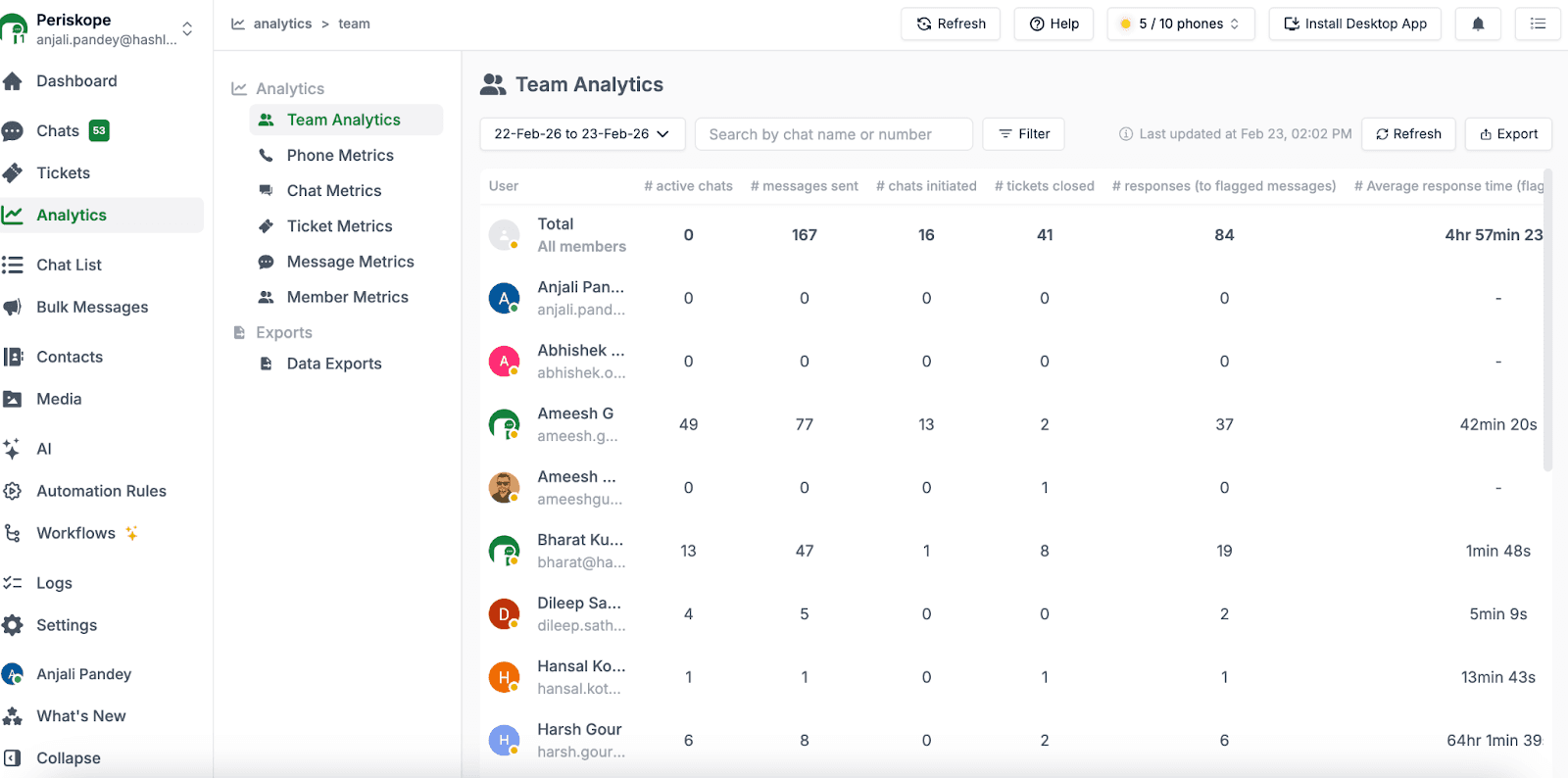
Dashboards show what matters: Average response time per group. Which clients need more attention. Team member workload distribution. SLA compliance trends. Message volume patterns, and you can use this data to improve your process.

View detailed analytics

Periskope was built for operations teams coordinating through WhatsApp groups. Here's how it works:

1. Get Visibility Across All Your Groups

Your team manages dozens or hundreds of WhatsApp groups for client projects, vendor coordination, customer support, and internal ops. Right now, these groups are scattered across team members' phones with no visibility into what's pending.

What you get with Periskope:

One dashboard shows every group. Search for any conversation instantly. See which groups need attention. Jump into any conversation and respond. Your entire team sees the same view in real-time.

No more "did anyone respond to the client in that booking group?" No more scrolling through 47 unread groups looking for urgent requests.

Real impact: Treebo operations team manages 3,000+ enterprise booking groups from one dashboard. Every conversation is visible. Nothing gets missed.

See how they do it →

2. Stop Losing Critical Requests in Busy Groups

A client asks, "Can you confirm the delivery?" in a group with 50 messages that day. It gets buried under "thanks" and "got it." Two days later, the client is frustrated. You had no idea they were waiting.

This happens constantly when operations run through WhatsApp groups.

What you get with Periskope:

Automatic ticketing pulls important messages out of the noise. Set rules based on your workflow: "urgent," "payment issue," "delivery delay," client name, or any keyword. Periskope creates tickets automatically, assigns them, and tracks them until closed.

Your team sees one view: all open tickets across all groups. Clear ownership. Nothing falls through.

Real impact: Indonesian fintech processes 800+ customer queries daily on WhatsApp groups. Every payment issue auto-creates a ticket. Assigned to the right team instantly. Resolved within 15 minutes. See their workflow →

3. Meet Response Time Commitments Automatically

You promised VIP clients 15-minute response times. Your team is handling 50 groups simultaneously. Someone misses a message. You find out when the client escalates via email. The relationship is already strained.

Manual SLA tracking doesn't work when you're managing dozens of time-sensitive conversations.

What you get with Periskope:

Set response time thresholds by client type or urgency. VIP client: 10 minutes. Enterprise booking: 30 minutes. Standard query: 2 hours.

If a message goes unanswered past the threshold, Periskope escalates automatically. Sends alert to manager. Flags in the dashboard, and ensures someone picks it up immediately.

You see SLA compliance in real-time. Know when response times are slipping and fix issues before clients notice.

4. Give Your Team Access Without Adding 10 Numbers to Every Group

Your 10-person operations team needs to access client groups. You can't add 10 phone numbers to every group. Clients get confused. When someone’s on leave, conversations stop.

What you get with Periskope:

Team members log in with their email, see relevant groups based on their role, and respond from the dashboard. Messages appear from your company's WhatsApp number—one professional number that clients recognize.

Give your team access via email

If Sarah starts a conversation and is not available, David picks it up seamlessly without forwarding screenshots or asking Sarah for context.

5. Let AI Handle the Repetitive Work

Your team spends hours identifying which messages need action. Flagging urgent issues. Deciding who should handle what. Copying information into your CRM. This manual work kills productivity.

What you get with Periskope:

AI reads every message across all groups. Identifies urgent issues automatically. Flags payment problems, delivery delays, and VIP client requests. Suggests which team member should handle each issue based on expertise and workload.

Set smart automation rules, for example: "If client mentions payment issue → flag message, create high-priority ticket, assign to finance team, log in HubSpot."

One event triggers multiple actions. Your team focuses on solving problems, not on administrative work.

Want to add an AI agent to your WhatsApp groups? Learn how.

6. Connect Your CRM So Data Syncs Automatically

Your operations team lives in HubSpot, Salesforce, or Zoho. They handle a WhatsApp conversation with a client. Then they manually copy everything into the CRM. They do this 50 times a day. Information gets missed. CRM stays outdated.

What you get with Periskope:

WhatsApp syncs with your CRM automatically. Conversations log without manual entry. Contacts update. Deal stages change based on WhatsApp activity.

Works both ways: When deal status changes in your CRM, Periskope sends automated WhatsApp messages like, "Your application moved to review stage," "Your booking is confirmed," or "Payment received.

Real impact: Education consulting firm integrated CRM with Periskope. Lead status changes trigger automated WhatsApp messages to students. 20,000 automated messages monthly. The sales team doubled its volume without hiring. See how they scaled →

7. Know What's Actually Happening Across Your Operations

You don't know which clients are getting fast responses. Which team members are overwhelmed. Where bottlenecks exist. You find out about problems when clients complain.

What you get with Periskope:

Dashboards show what matters: Average response time per group. Which clients need more attention. Team member workload distribution. SLA compliance trends. Message volume patterns, and you can use this data to improve your process.

View detailed analytics

Try Periskope

Manage WhatsApp Groups, Chats and Numbers at Scale

Cost Comparison for Operations Teams

Let's compare what you'd actually pay as an operations team.

➤ WATI Pricing (2026)

Monthly plans:

  • Growth: $28/month (3 users)

  • Pro: $66/month (5 users)

  • Business: $187/month (5 users)

Additional costs:

  • Extra users: $20-40/user/month, depending on plan

  • Per-message fees: Meta's conversation charges + BSP markup (15-25%)

The fundamental issue: WATI doesn't support WhatsApp groups. Even at the highest tier, you can't access the groups where your operations happen.

➤ Periskope Pricing (2026)

Monthly plans:

  • Starter: $20/seat

  • Pro: $30/seat (includes HubSpot, Freshdesk, Zoho integrations + advanced analytics)

  • Enterprise: Custom (minimum 50 seats)

What's included:

  • The first WhatsApp number is free

  • Unlimited groups, chats, and messages

  • No per-message fees

  • Additional phone numbers: $20-30/month each

➤ The Real Difference

WATI charges per user and per message (through Meta fees). Periskope charges per seat with unlimited messages.

More importantly: WATI doesn't support groups. You're comparing a tool that can't do the job versus one built specifically for it.

The question isn't "which is cheaper?" It's "which one actually works for operations workflows?"

Let's compare what you'd actually pay as an operations team.

➤ WATI Pricing (2026)

Monthly plans:

  • Growth: $28/month (3 users)

  • Pro: $66/month (5 users)

  • Business: $187/month (5 users)

Additional costs:

  • Extra users: $20-40/user/month, depending on plan

  • Per-message fees: Meta's conversation charges + BSP markup (15-25%)

The fundamental issue: WATI doesn't support WhatsApp groups. Even at the highest tier, you can't access the groups where your operations happen.

➤ Periskope Pricing (2026)

Monthly plans:

  • Starter: $20/seat

  • Pro: $30/seat (includes HubSpot, Freshdesk, Zoho integrations + advanced analytics)

  • Enterprise: Custom (minimum 50 seats)

What's included:

  • The first WhatsApp number is free

  • Unlimited groups, chats, and messages

  • No per-message fees

  • Additional phone numbers: $20-30/month each

➤ The Real Difference

WATI charges per user and per message (through Meta fees). Periskope charges per seat with unlimited messages.

More importantly: WATI doesn't support groups. You're comparing a tool that can't do the job versus one built specifically for it.

The question isn't "which is cheaper?" It's "which one actually works for operations workflows?"

Moving from WATI to Periskope

If you're hitting WATI's group limitation, here's how to switch:

Step 1: Test Periskope (14-Day Free Trial)

Go to periskope.app and start your free trial. Connect your WhatsApp number via QR code (takes 2 minutes). Your existing groups appear immediately in the dashboard.

Add team members via email. Set up ticketing rules and SLA thresholds. Test the workflow with real conversations.

What you'll notice immediately:

✅ All your groups are visible in one dashboard

✅ Team members can access and respond

✅ Tickets created automatically from group messages

✅ SLA tracking shows which groups need attention

Step 2: Choose Your Setup

Option A: Dual setup

Keep WATI for marketing broadcasts. Use Periskope for operations and group management. Different phone numbers for different workflows.

Why this works: Marketing team keeps WATI's broadcast features. Operations team gets the group management they need. No disruption to existing campaigns.

Option B: Full migration

Switch entirely to Periskope if WATI isn't meeting your operations needs.

Periskope handles customer support through groups or 1-to-1. Has bulk messaging (3,000 credits per license monthly). Works if you don't need Click-to-WhatsApp ads or verification mark.

Step 3: Get Your Team Started

Your team needs 3-5 days to get comfortable with Periskope. Most teams prefer it after the first week once they see full visibility across all groups.

Data handling:

  • WhatsApp groups and conversations: Stay in WhatsApp, accessible immediately through Periskope

  • WATI data: Export broadcast lists, contacts, and reports before canceling

Ready to switch? 

Start 14-day free trial → 

Book a 30-minute demo →

FAQs

1. Does Periskope have marketing features like WATI?

Periskope has bulk messaging (3,000 credits per license monthly) and basic broadcast capabilities. It's not optimized for large-scale marketing campaigns like WATI. If you need both marketing broadcasts AND operations group management, you can use both tools.

2. Can I access my existing WhatsApp groups with WATI?

No. WATI's documentation explicitly states: "WATI does not support sending messages to WhatsApp groups."

3. What's the main difference between WATI and Periskope?

WATI: Built for marketing broadcasts and 1-to-1 customer support using WhatsApp Business API. Can't access WhatsApp groups.

Periskope: Built for operations teams managing WhatsApp groups at scale. Full group access with ticketing and SLA tracking.

4. Can I try Periskope before canceling WATI?

Yes. Periskope offers a 14-day free trial. You can test group management features without canceling WATI. Connect your WhatsApp number via QR code and evaluate if it fits your operations workflow.

5. Does Periskope require WhatsApp Business API?

No. Periskope works with regular WhatsApp numbers using WhatsApp Web's multi-device protocol. This gives you full group access without API restrictions like template approvals or 24-hour conversation windows.

6. What happens to my conversation history when switching?

Your WhatsApp conversation history stays in WhatsApp. When you connect to Periskope via QR code, all your existing chats and groups appear immediately. Nothing needs migrating.

7. Can my sales team keep using their existing WhatsApp number with Periskope?

Yes. Periskope connects to your existing WhatsApp number via QR code. Your sales team keeps the same number clients already have. All conversation history remains intact.

WATI requires a new WhatsApp Business API number, which means asking clients to save a new contact and losing existing conversation history.

8. How long does it take to set up Periskope for a 10-person operations team?

Initial setup: 10-15 minutes to connect WhatsApp and add team members.

Full configuration: 1-2 days to set up automation rules, SLA thresholds, and CRM integrations.

Team onboarding: 3-5 days for the team to get comfortable with the new workflow.

Total time to be fully operational: About 1 week.

9. What are the best WATI alternatives for operations teams?

For operations teams that rely on WhatsApp, the best WATI alternatives are tools that:

  • Support WhatsApp groups

  • Allow use of existing WhatsApp numbers

  • Offer ticketing and SLA tracking

  • Enable multi-party coordination

Periskope is one of the few WATI alternatives specifically designed for operations teams managing WhatsApp groups at scale.

If you're hitting WATI's group limitation, here's how to switch:

Step 1: Test Periskope (14-Day Free Trial)

Go to periskope.app and start your free trial. Connect your WhatsApp number via QR code (takes 2 minutes). Your existing groups appear immediately in the dashboard.

Add team members via email. Set up ticketing rules and SLA thresholds. Test the workflow with real conversations.

What you'll notice immediately:

✅ All your groups are visible in one dashboard

✅ Team members can access and respond

✅ Tickets created automatically from group messages

✅ SLA tracking shows which groups need attention

Step 2: Choose Your Setup

Option A: Dual setup

Keep WATI for marketing broadcasts. Use Periskope for operations and group management. Different phone numbers for different workflows.

Why this works: Marketing team keeps WATI's broadcast features. Operations team gets the group management they need. No disruption to existing campaigns.

Option B: Full migration

Switch entirely to Periskope if WATI isn't meeting your operations needs.

Periskope handles customer support through groups or 1-to-1. Has bulk messaging (3,000 credits per license monthly). Works if you don't need Click-to-WhatsApp ads or verification mark.

Step 3: Get Your Team Started

Your team needs 3-5 days to get comfortable with Periskope. Most teams prefer it after the first week once they see full visibility across all groups.

Data handling:

  • WhatsApp groups and conversations: Stay in WhatsApp, accessible immediately through Periskope

  • WATI data: Export broadcast lists, contacts, and reports before canceling

Ready to switch? 

Start 14-day free trial → 

Book a 30-minute demo →

FAQs

1. Does Periskope have marketing features like WATI?

Periskope has bulk messaging (3,000 credits per license monthly) and basic broadcast capabilities. It's not optimized for large-scale marketing campaigns like WATI. If you need both marketing broadcasts AND operations group management, you can use both tools.

2. Can I access my existing WhatsApp groups with WATI?

No. WATI's documentation explicitly states: "WATI does not support sending messages to WhatsApp groups."

3. What's the main difference between WATI and Periskope?

WATI: Built for marketing broadcasts and 1-to-1 customer support using WhatsApp Business API. Can't access WhatsApp groups.

Periskope: Built for operations teams managing WhatsApp groups at scale. Full group access with ticketing and SLA tracking.

4. Can I try Periskope before canceling WATI?

Yes. Periskope offers a 14-day free trial. You can test group management features without canceling WATI. Connect your WhatsApp number via QR code and evaluate if it fits your operations workflow.

5. Does Periskope require WhatsApp Business API?

No. Periskope works with regular WhatsApp numbers using WhatsApp Web's multi-device protocol. This gives you full group access without API restrictions like template approvals or 24-hour conversation windows.

6. What happens to my conversation history when switching?

Your WhatsApp conversation history stays in WhatsApp. When you connect to Periskope via QR code, all your existing chats and groups appear immediately. Nothing needs migrating.

7. Can my sales team keep using their existing WhatsApp number with Periskope?

Yes. Periskope connects to your existing WhatsApp number via QR code. Your sales team keeps the same number clients already have. All conversation history remains intact.

WATI requires a new WhatsApp Business API number, which means asking clients to save a new contact and losing existing conversation history.

8. How long does it take to set up Periskope for a 10-person operations team?

Initial setup: 10-15 minutes to connect WhatsApp and add team members.

Full configuration: 1-2 days to set up automation rules, SLA thresholds, and CRM integrations.

Team onboarding: 3-5 days for the team to get comfortable with the new workflow.

Total time to be fully operational: About 1 week.

9. What are the best WATI alternatives for operations teams?

For operations teams that rely on WhatsApp, the best WATI alternatives are tools that:

  • Support WhatsApp groups

  • Allow use of existing WhatsApp numbers

  • Offer ticketing and SLA tracking

  • Enable multi-party coordination

Periskope is one of the few WATI alternatives specifically designed for operations teams managing WhatsApp groups at scale.

Automate your WhatsApp with Periskope

Automate your WhatsApp with Periskope

Automate your WhatsApp with Periskope